



Tailored to your business, yours to keep

Stop losing revenue you could have kept.

Harbormaster HQ joins your billing, product, marketing and support data to show where money is slipping away: failed payments, customers about to leave, visitors who almost signed up. Each one goes to someone on your team, or to one of its agents, with a deadline.

Works with the systems you already run

  • HubSpot
  • Intercom
  • PostHog
  • Buffer
  • Stripe
  • SendGrid
  • Customer.io
  • Apollo
  • OpenRouter
  • Slack
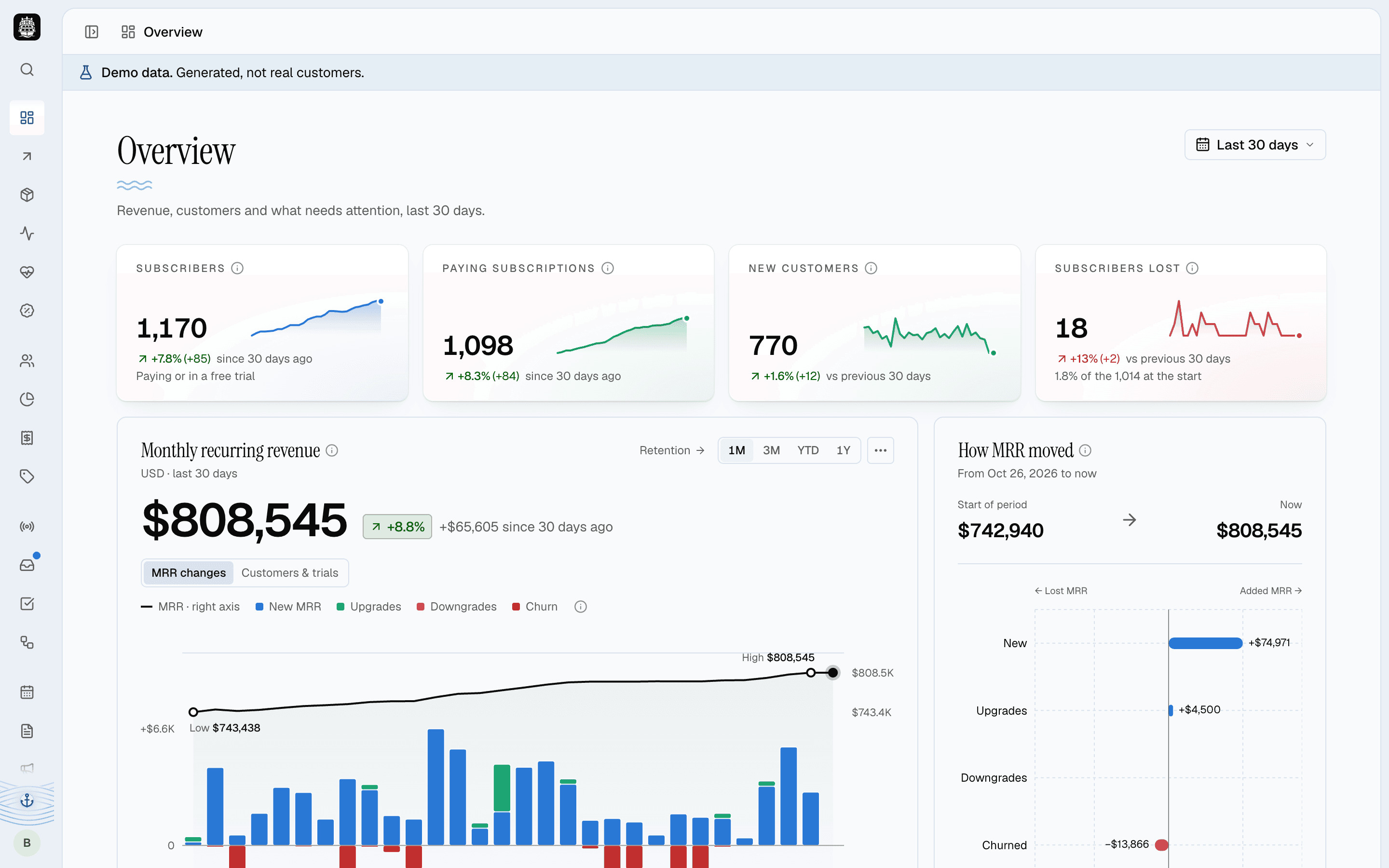
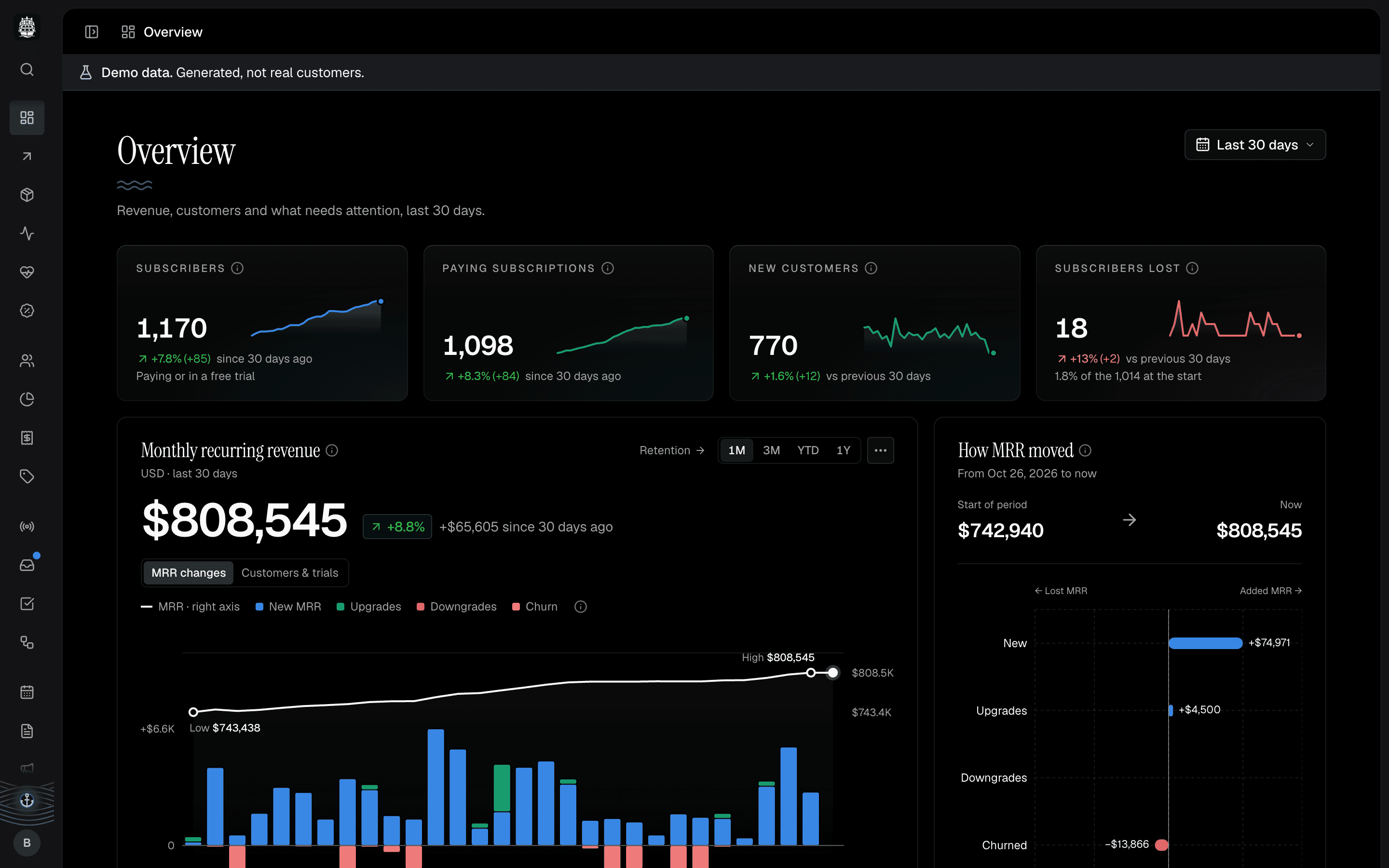
The overview: subscribers, paying subscriptions, new customers and subscribers lost, then monthly recurring revenue over 30 days with its daily changes, and how it moved.

How it works

A signal comes in. Someone is already on it.

Your automations turn the events that matter into tasks with an owner and a due date, agents do the work, and every email they draft waits for a person to approve it.

  1. 01

    Events arrive

    Billing, product, sales, support and email systems report what each customer does, as it happens, along with replies to your team's mail and custom events from your own systems.

  2. 02

    Automations decide

    Your rules pick out what's worth a follow-up: a trial ending while the team is still using it, a failed renewal, a cancellation you can still talk someone out of.

  3. 03

    Agents take the work

    Each one becomes a task with a priority and a due date. Agents pick tasks up and move them along the board, where your team can see every one.

  4. 04

    A person approves

    Every email an agent drafts waits in the Outbox with the reason it was written. Nothing reaches a customer until someone on your team approves it.

Who it's for

Built for subscription businesses

  • B2B SaaS

    Know which visitors to call, and which accounts to protect before renewal.

  • B2C SaaS

    See where trials stall, who is about to lapse and who is worth winning back.

  • Memberships and publishing

    See which campaigns bring members who stay, and recover the ones whose payments fail.

Know exactly how much is at stake

Failed payments, customers scheduled to cancel and accounts going quiet each carry a dollar figure. See the total, see who it sits with, and decide what is worth chasing.
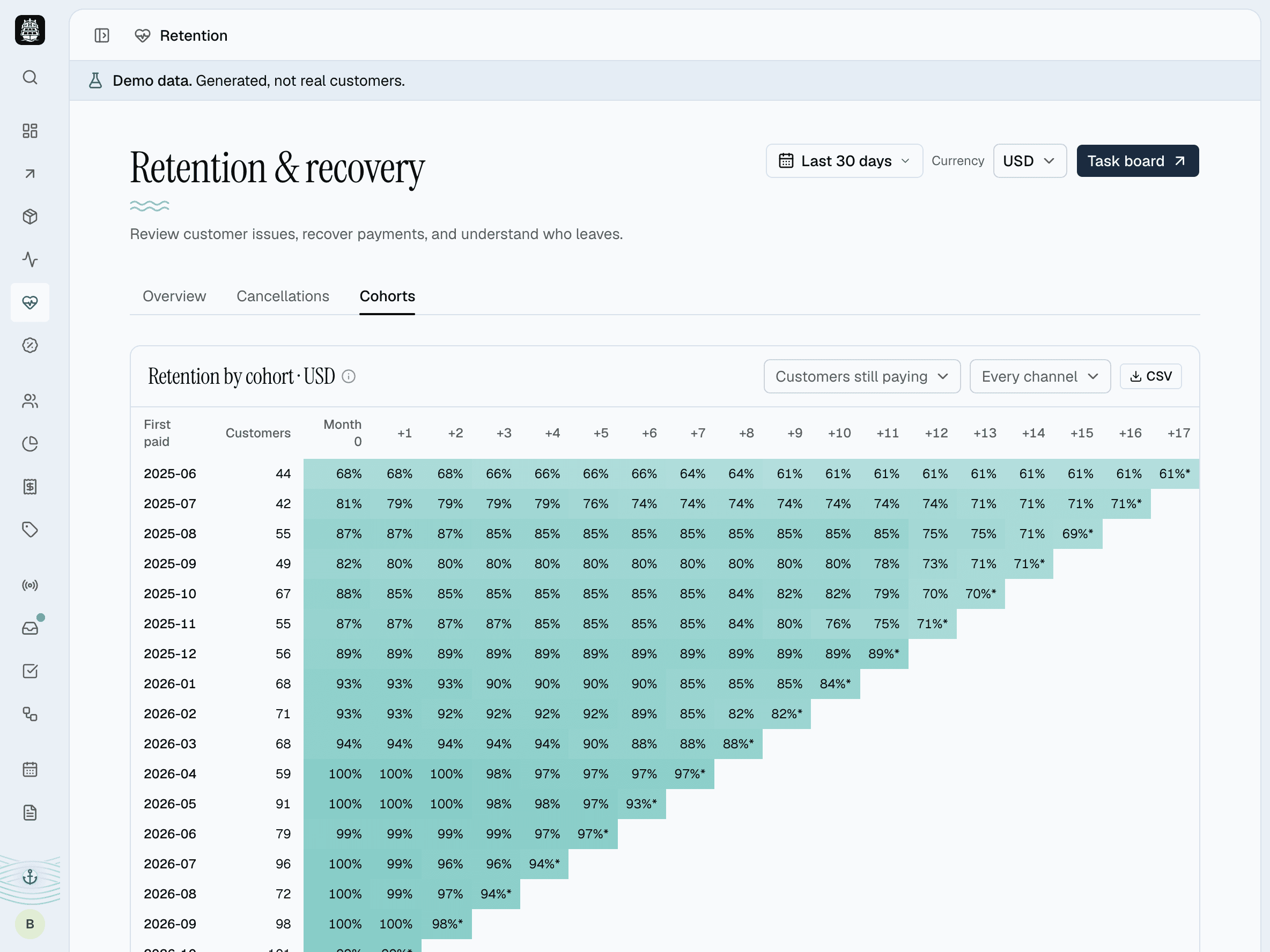
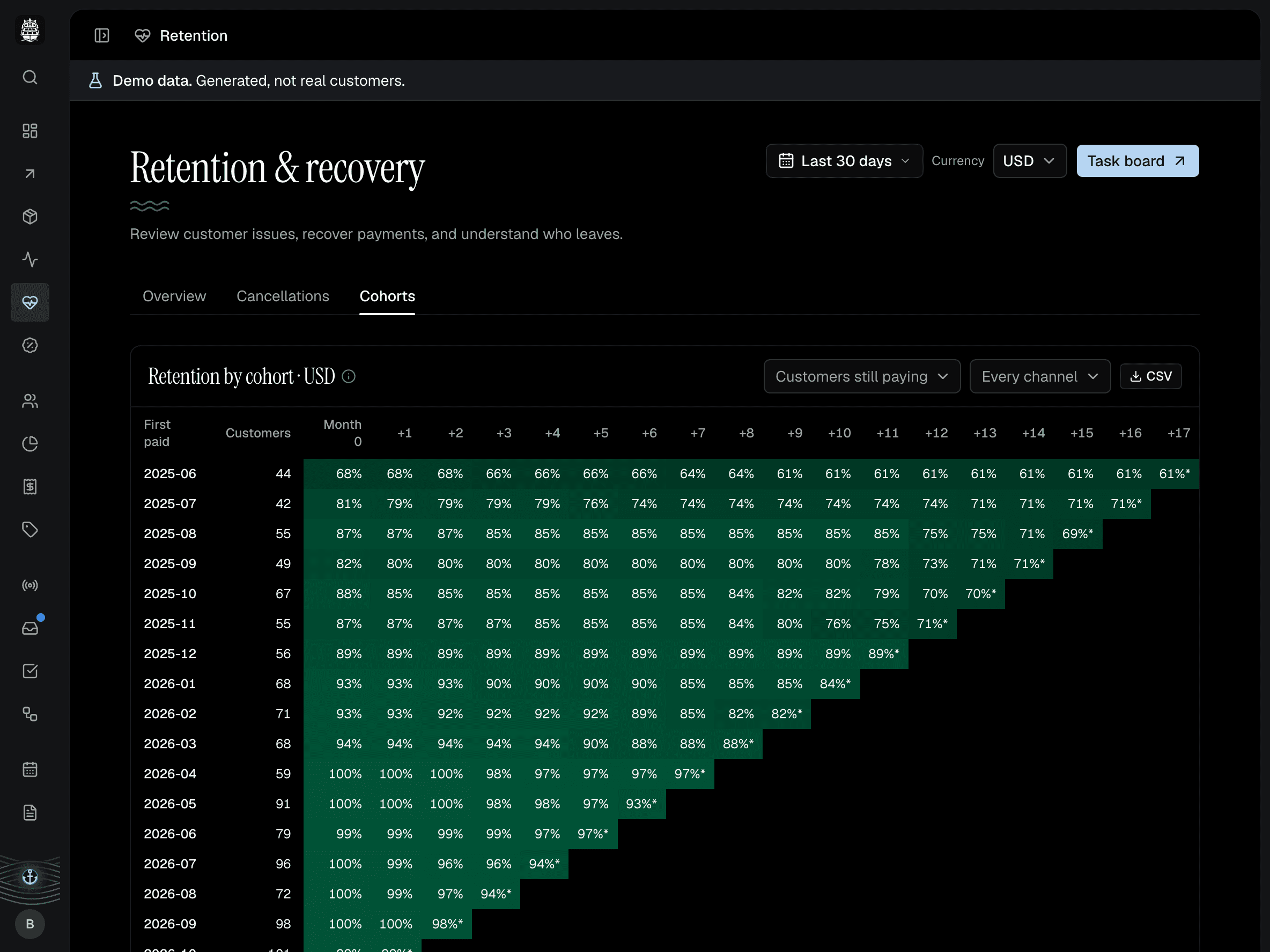
Retention by the month customers first paid: the share of each month's customers still paying, one column per month since.

Failed payments, largest first

Every failed payment is listed by what the account is worth, so the first call goes to the biggest one.

Cancellations you can still stop

See who has scheduled a cancellation, and how long you have before it takes effect.

The ones worth winning back

Read why customers left and what they paid you, and pick the few worth a personal offer.
Know if a sale is working while it's still running

By the first afternoon you can see what a sale is bringing in over an ordinary week. That leaves time to push harder, extend it or stop giving margin away.

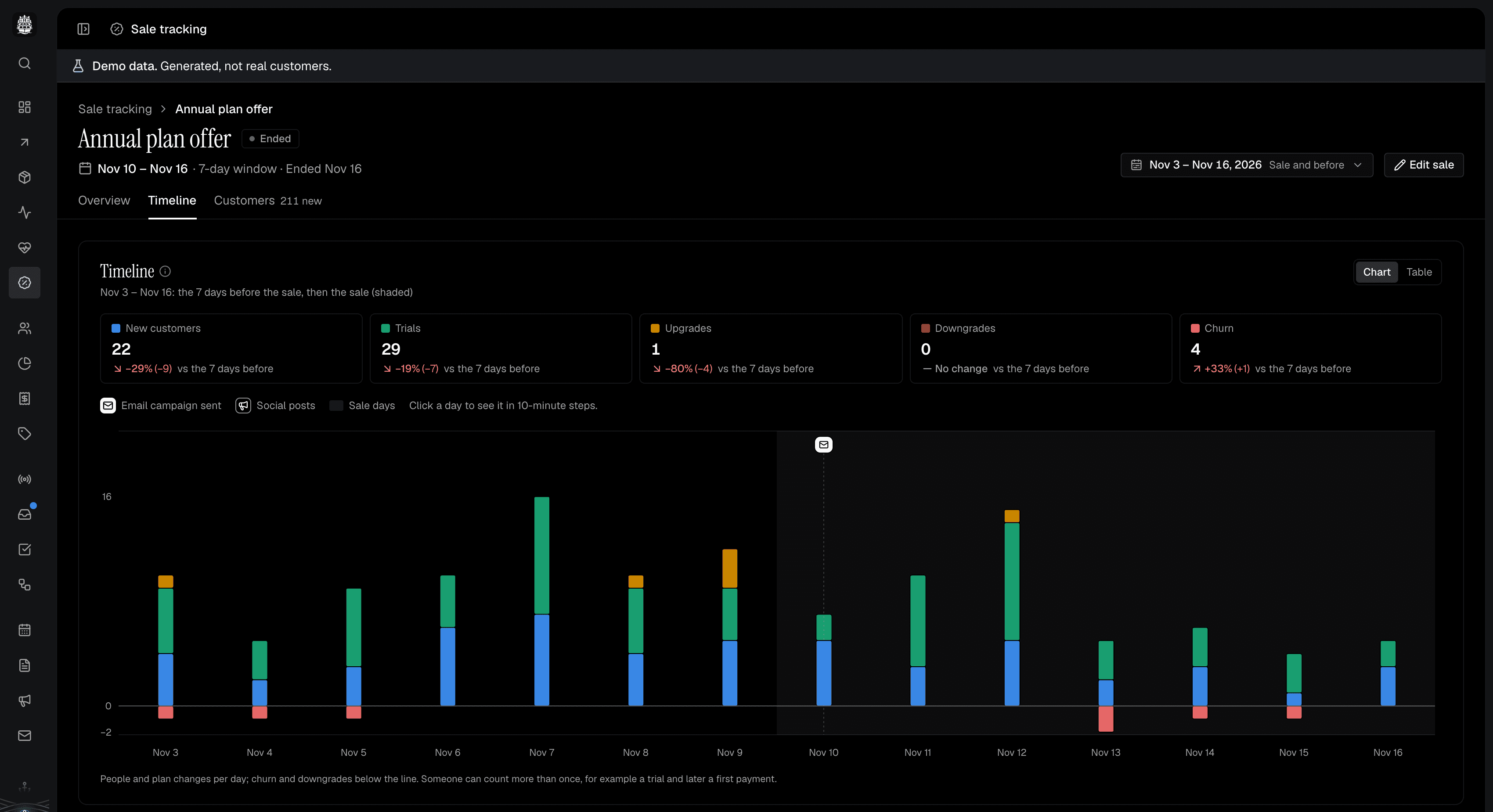
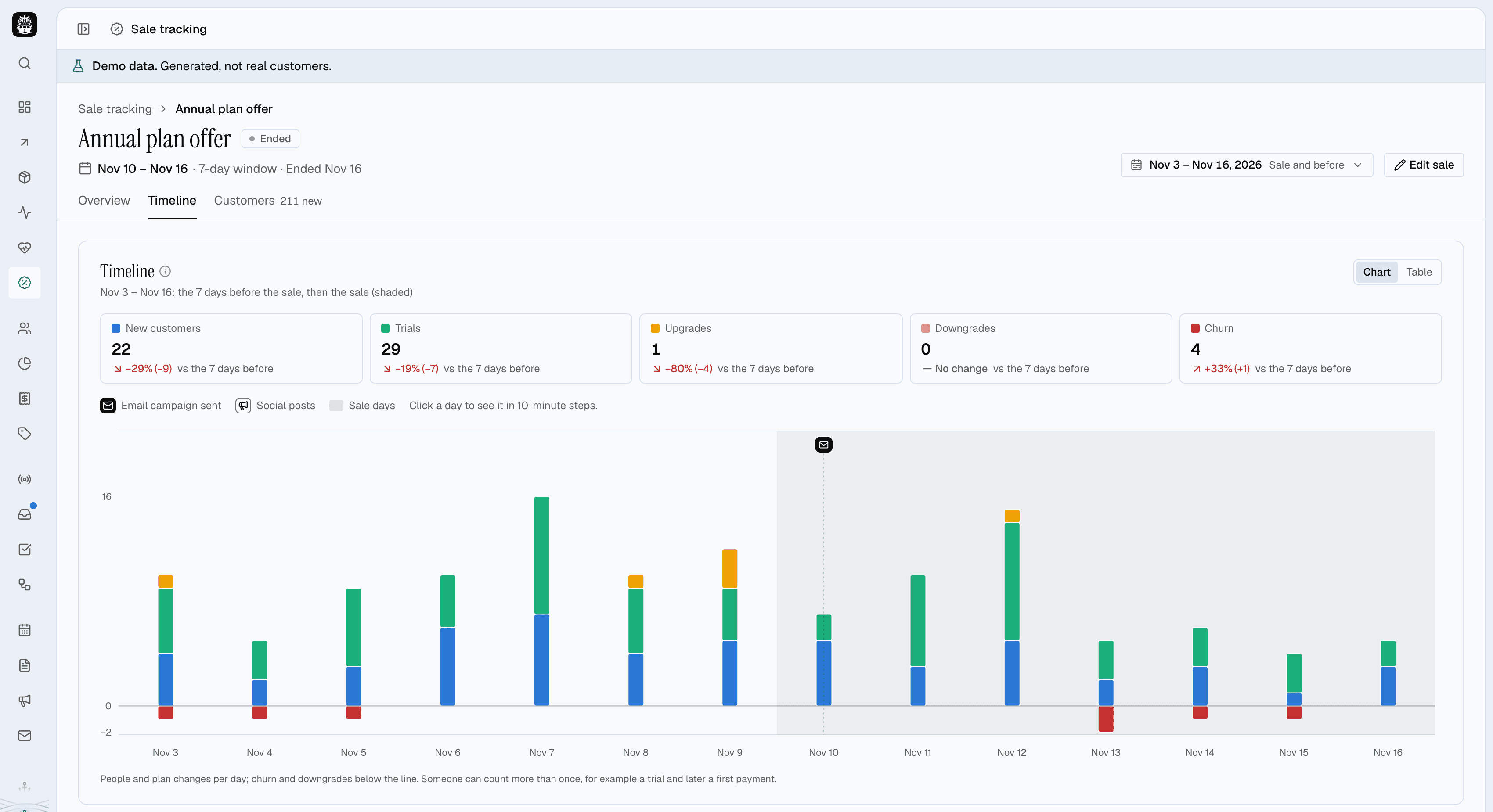
An annual plan offer's timeline, from demo data: new customers, trials, upgrades, downgrades and churn day by day, the week before the sale beside the sale's own week (shaded), with the day its email campaign went out marked.

What the discount is buying

New customers, upgrades and churn during the sale.

Which sends moved people

See which campaigns were followed by a rush of orders, and which by nothing.

Next year's plan, written this year

Keep the record of each sale: what went out, when, and what followed.

Fund the content that pays for itself

Most content reports stop at views. Here every article, email and post shows the customers it brought in and what they have paid since, so the next piece is commissioned on revenue, not traffic.

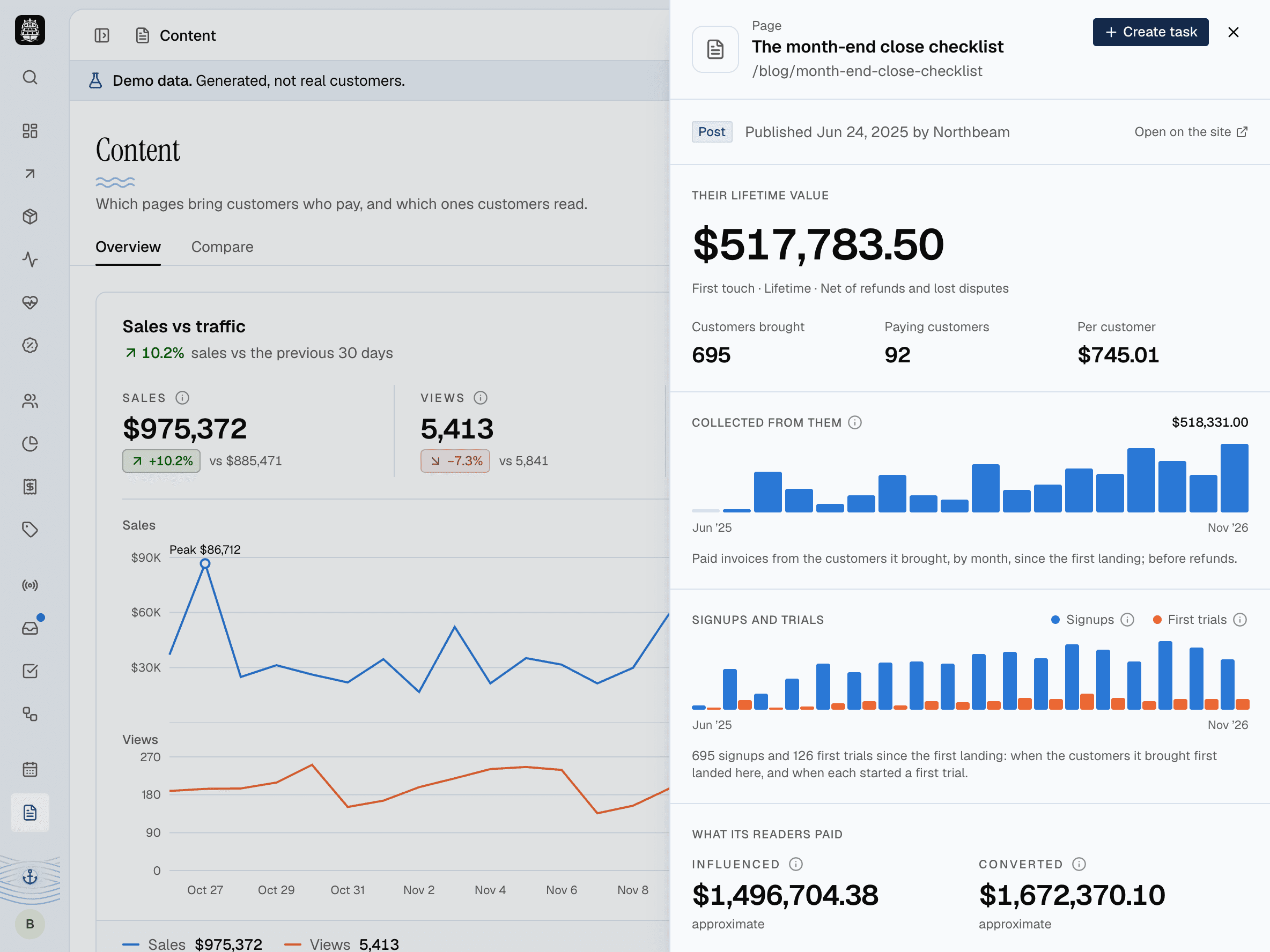
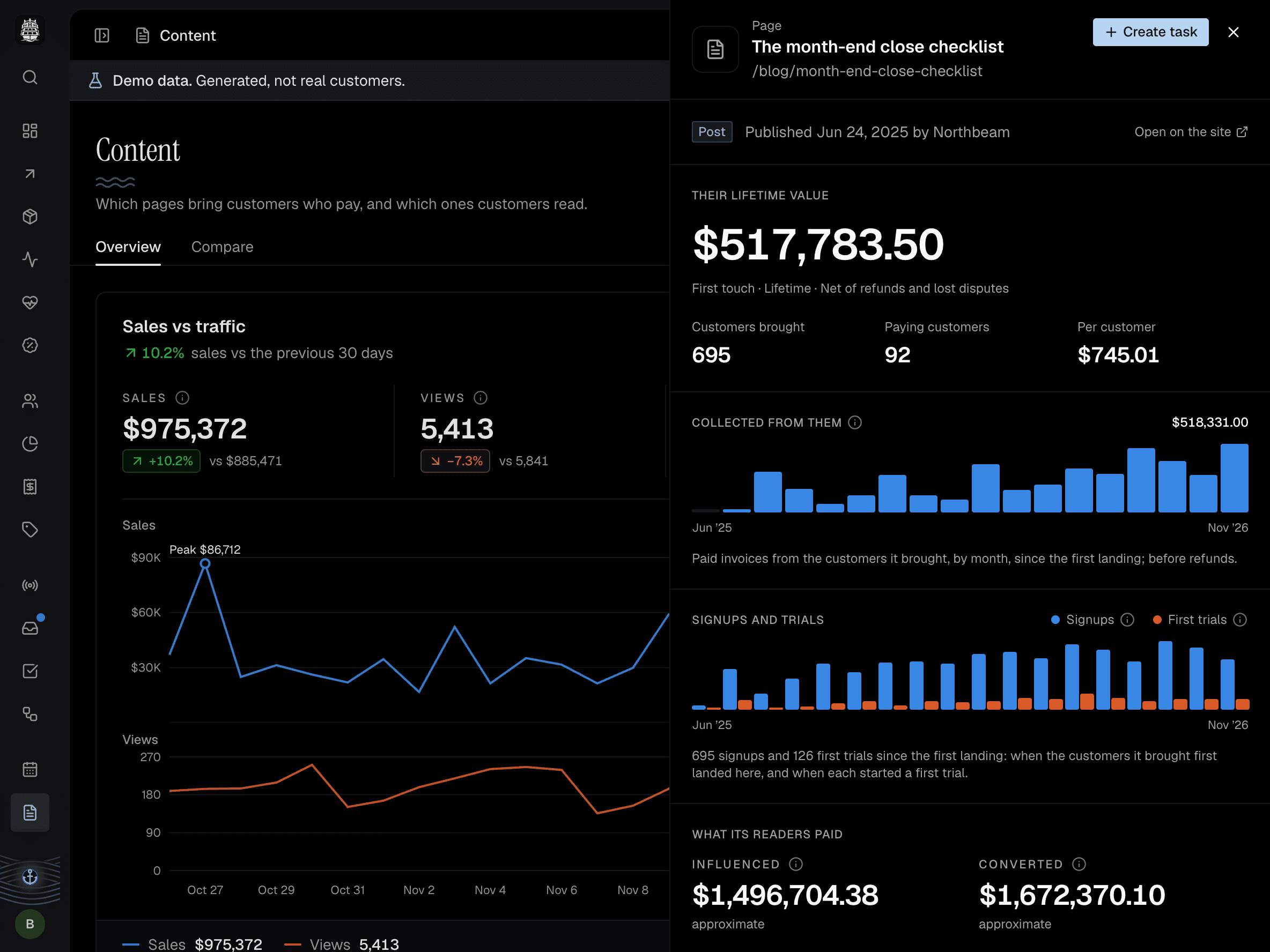
An article's panel, from demo data: The month-end close checklist brought in 695 customers, 92 of them paying, worth $517,783.50 in all; what they have paid month by month since June 2025, and each month's signups beside first trials.

What each article has earned

Every page shows what the customers it brought in have paid, month by month since it went live.

Traffic and sales, side by side

Views and paid invoices on one time axis, so a spike in readers that brought no money shows up as exactly that.

Articles, emails and posts in one ranking

Everything you publish, ranked by what its customers went on to pay, so the budget moves to what works.

Post where the paying customers come from

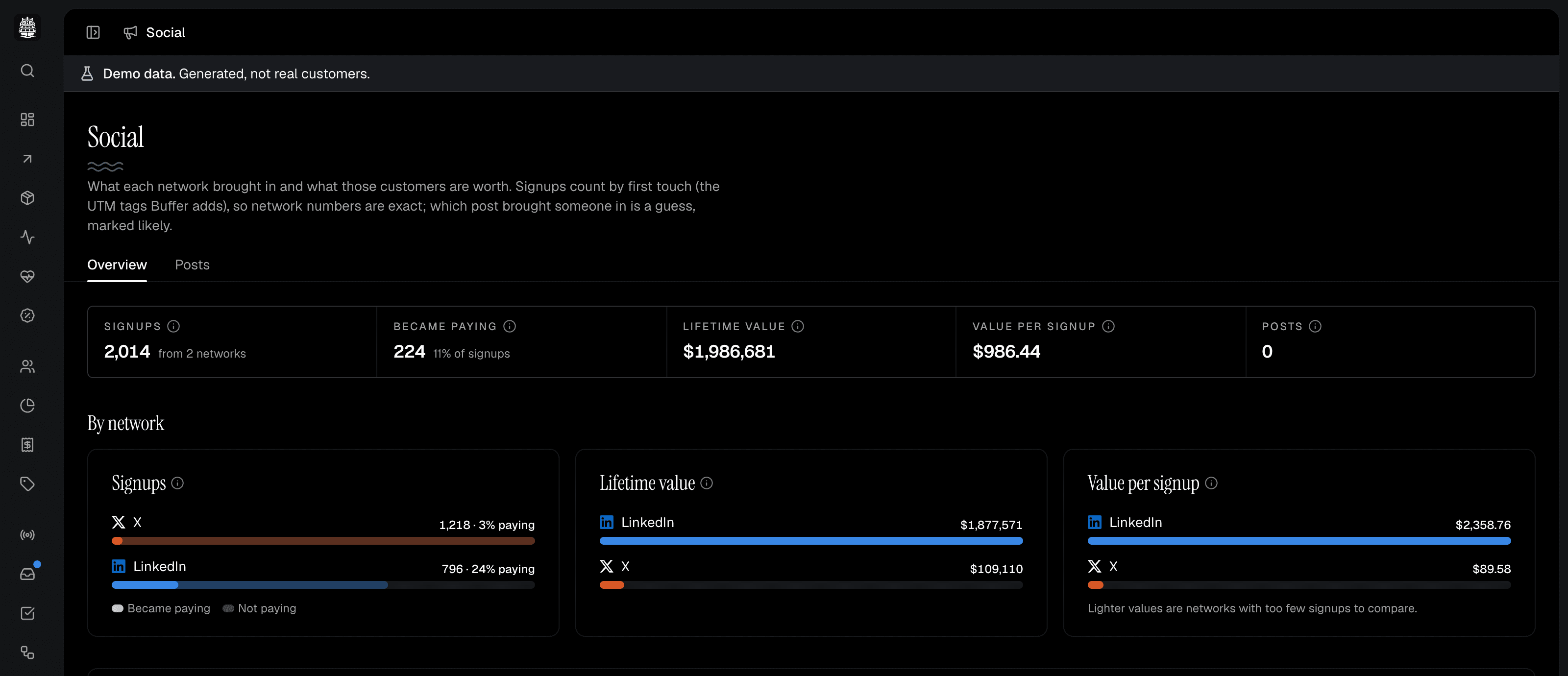
Followers and likes don't pay the bills. See how many customers each network sends you, how many of them pay and what they are worth, so the team's time goes to the network that brings revenue.

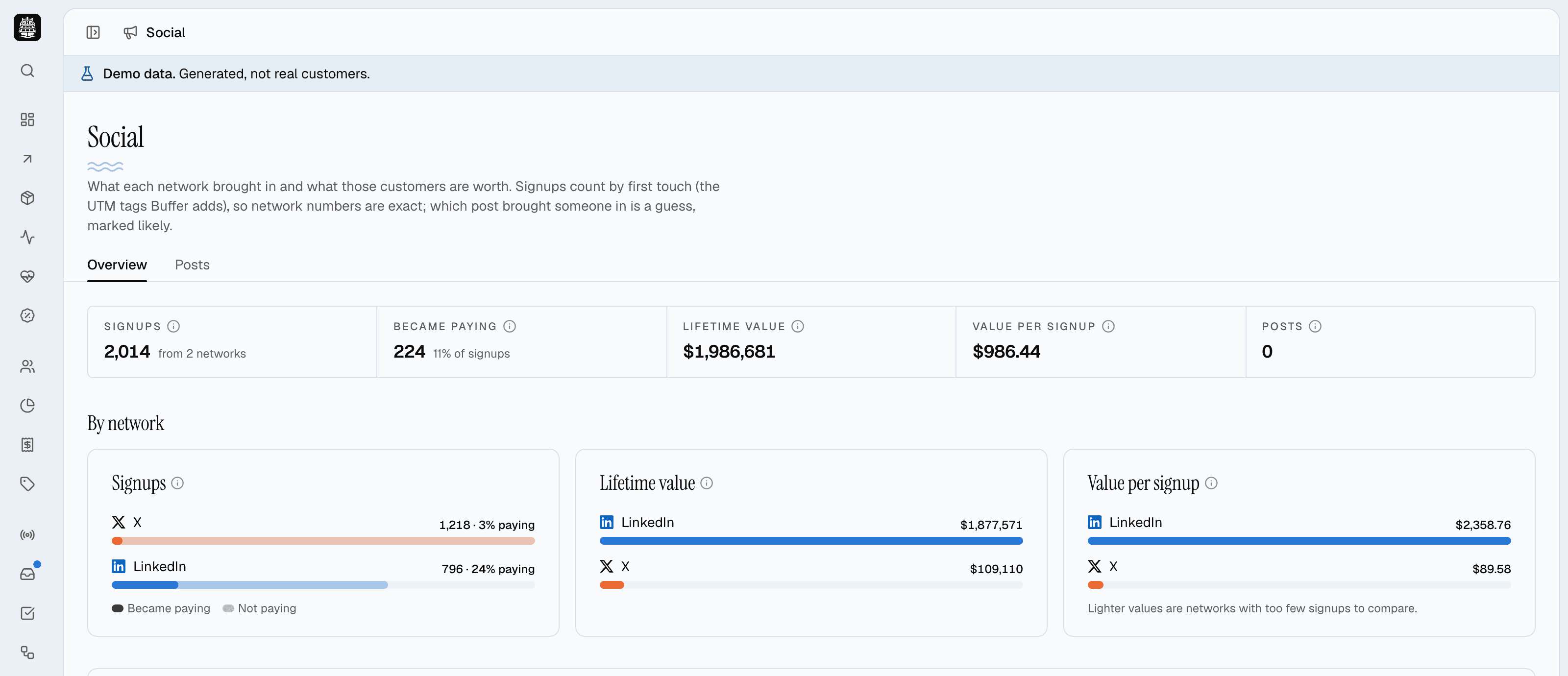
Social, from demo data: signups, lifetime value and value per signup by network. X brought the most signups, 1,218, at $89.58 each; LinkedIn brought 796 at $2,358.76 each.

Most signups isn't most revenue

The network that sends the most signups is rarely the one that sends the most money. Value per signup tells them apart.

Counted, not guessed

Signups come from the tracking tags on the links you share, so each network's total is exact.

The posts behind it

Each post shows the signups it likely brought and what they have paid since, so the next post copies what made money.

Call the visitors who are already interested

Plenty of people read your pricing page and never fill in a form. See who they are where a match exists, what they looked at and where they gave up on signup, while the interest is hours old.

AM

Alex Morgan

Head of Growth · a 40-person fintech

Matched
  • /pricing3 visits · 4m 10s
  • /docs/api1 visit · 2m 45s
  • /signupStopped at company details

Why now: back on pricing three times this week, and didn't finish signup.

T-214 · To do · High

Reach out to Alex Morgan: back on pricing

LinkedIn profileVisit historyWhy nowEmail via Apollo

A name, a role, a company

Visitors are matched to LinkedIn profiles, so sales starts with a person instead of an anonymous session.

The reason to call today

Three visits to pricing and an abandoned signup say more than a lead score. Each prospect arrives with that history.

Reach out the same day

An agent drafts the first email about their company, so sales reaches them while they're still deciding.

Know which accounts need you this week

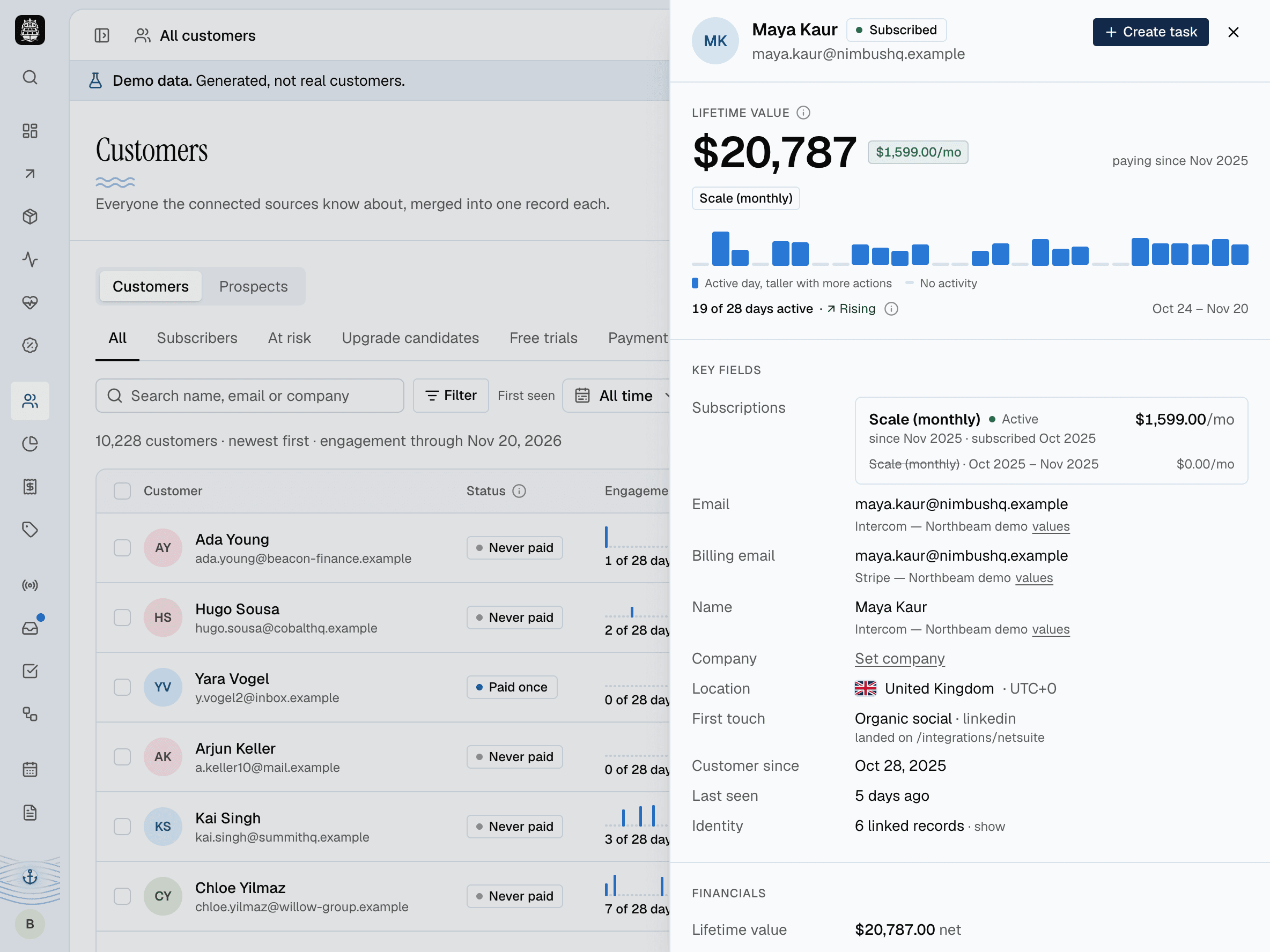
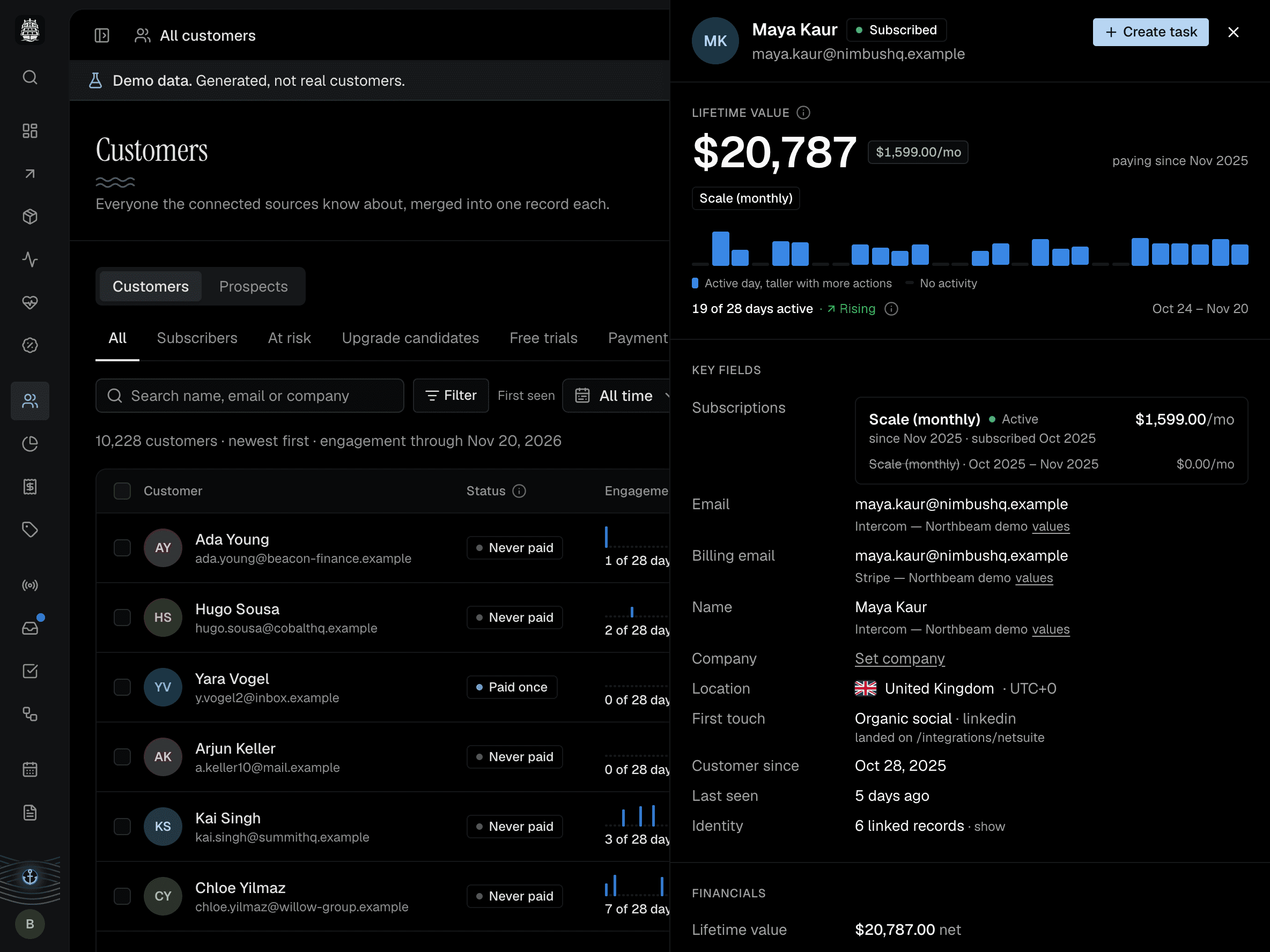
Every customer has one record: what they pay, how much they use the product and what they have told support. That is enough to see who is slipping, who is ready for more and who is fine.

A customer's panel: status, lifetime value, engagement and key fields, beside the customer list.

Worth, at a glance

Lifetime value sits beside every name, so attention goes to the accounts that matter most.

Slipping, before they say so

Falling usage and open tickets show up weeks before a cancellation does.

Ready for more

Customers pressing against their plan, and trials active enough to convert, are listed for an offer.

Nothing waits for someone to notice

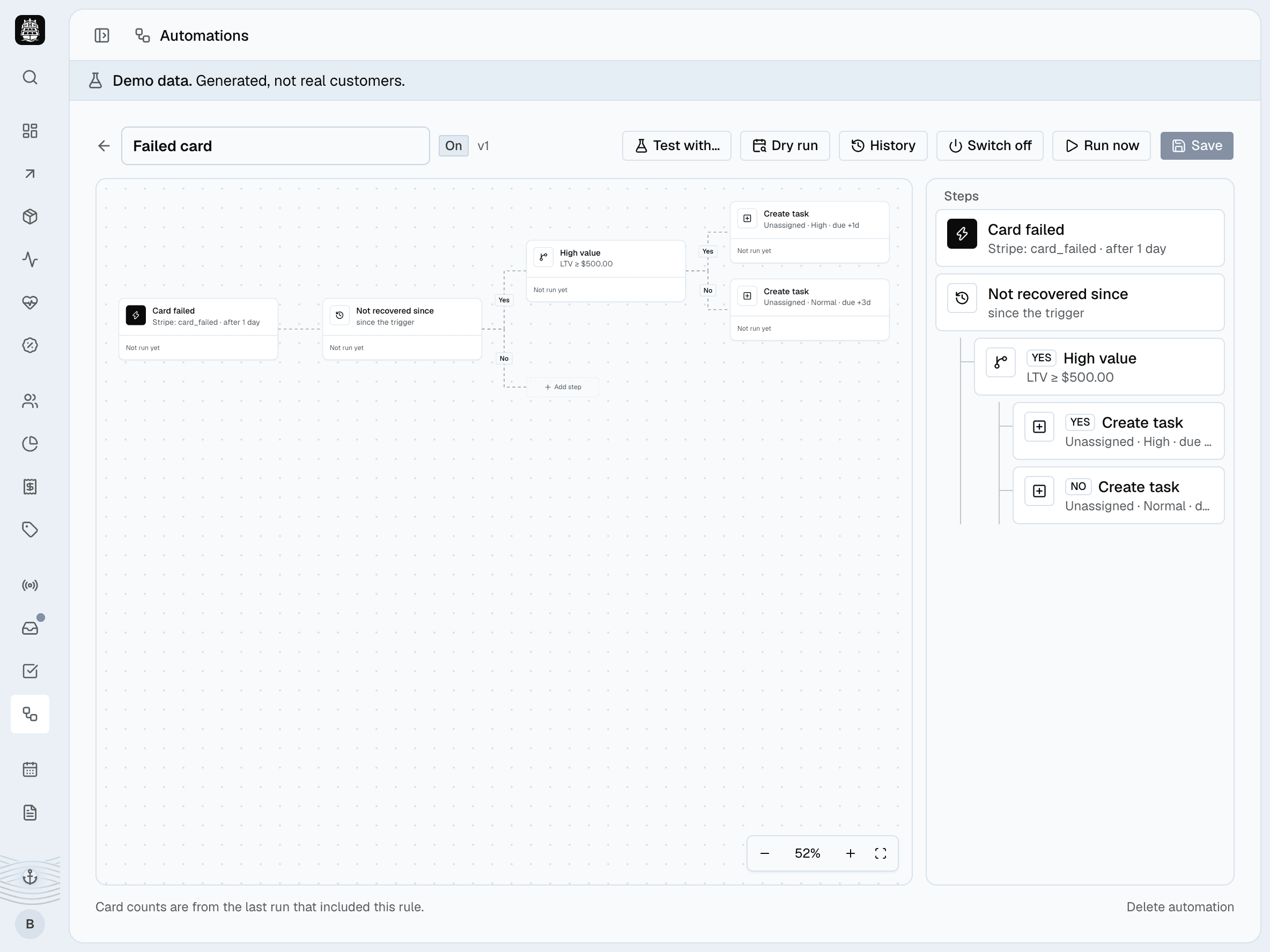
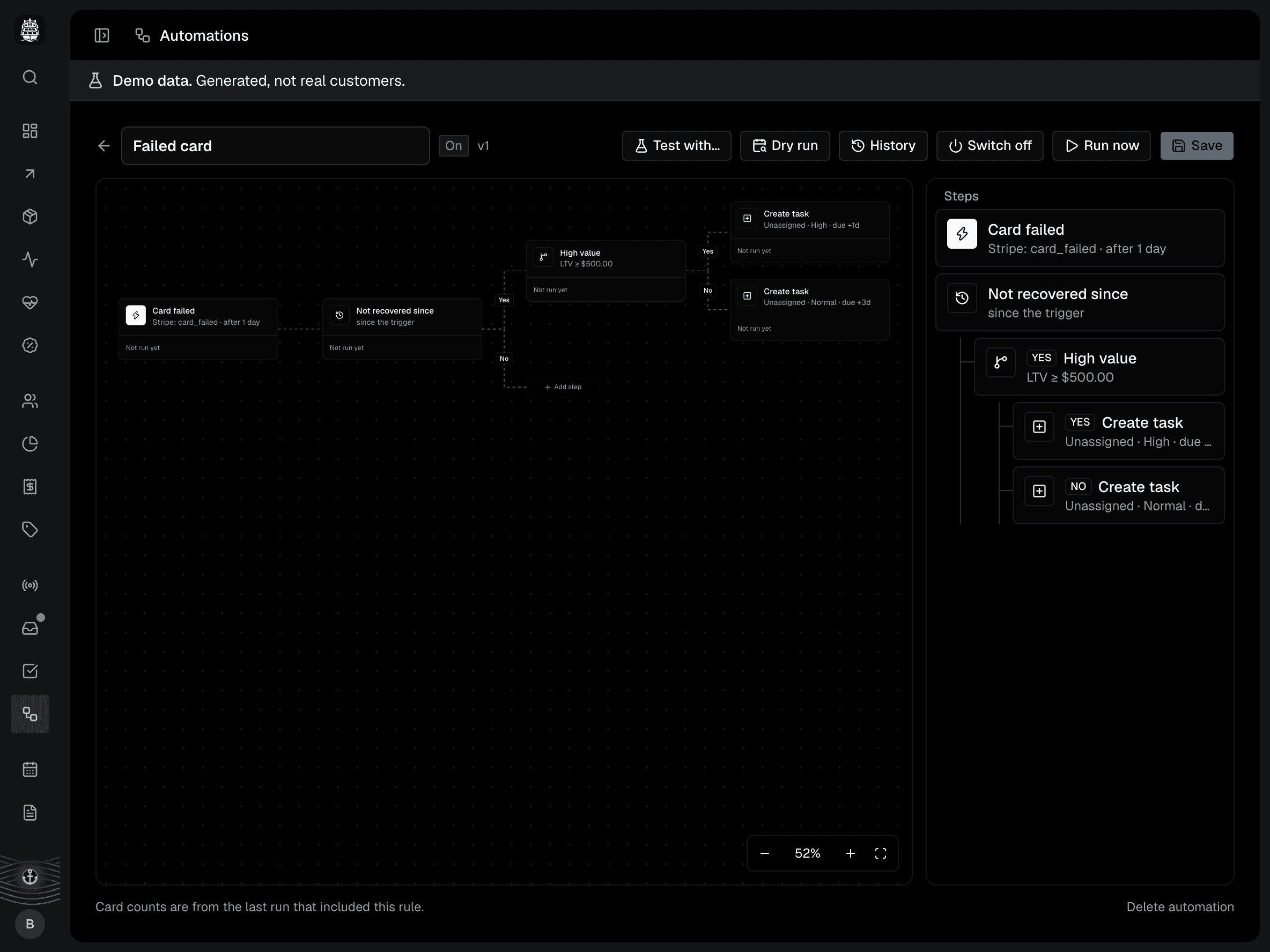
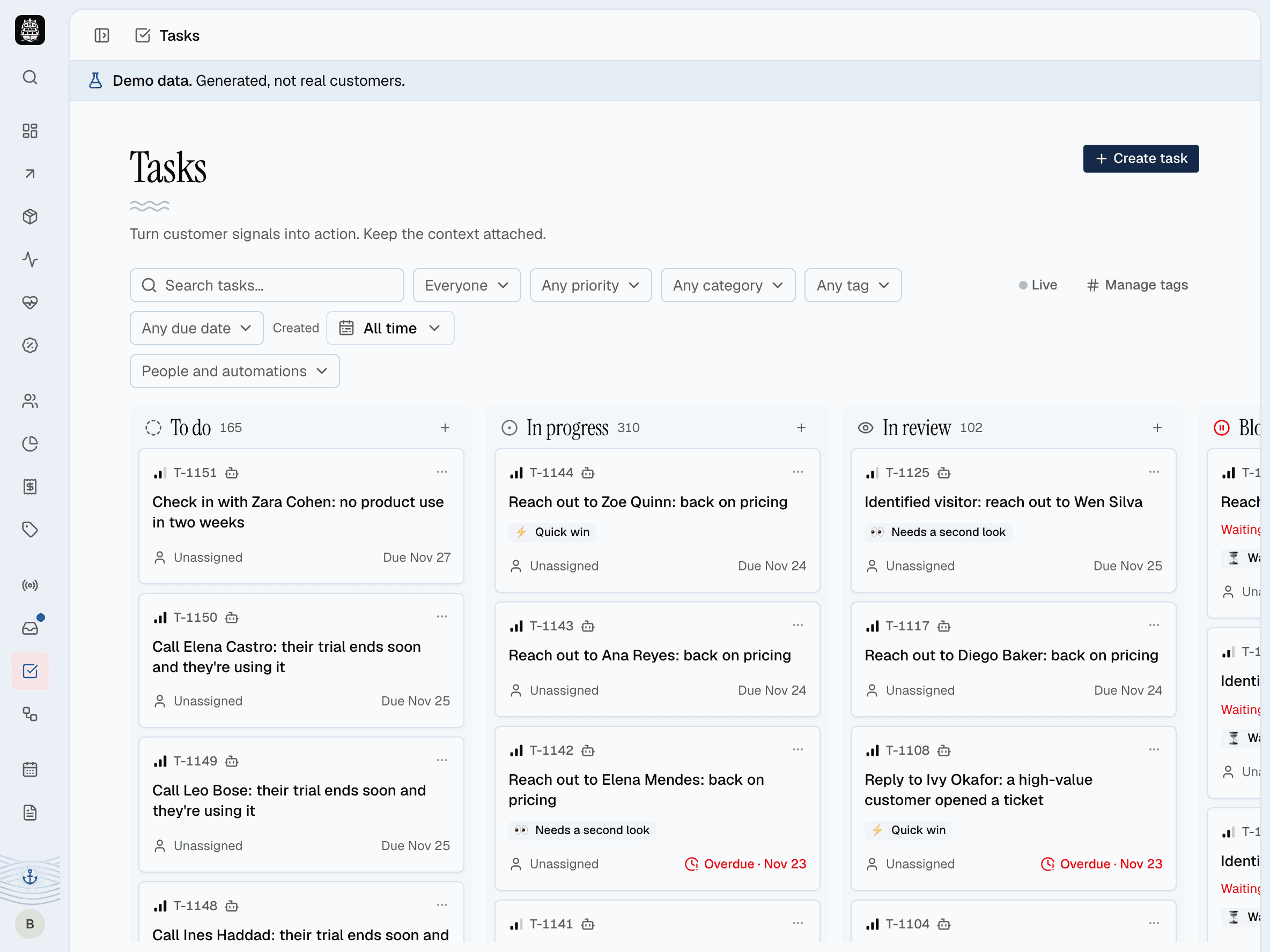
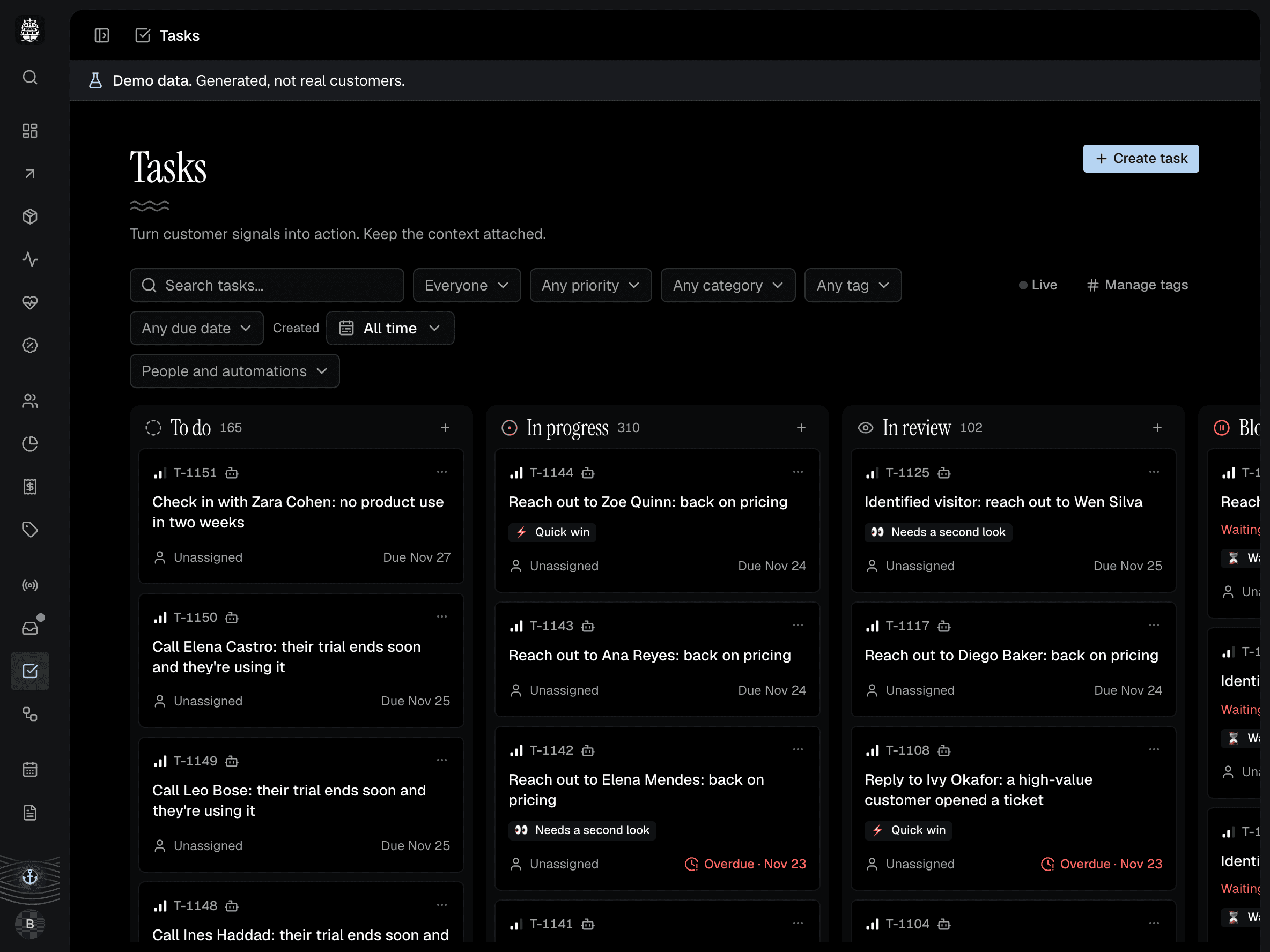
When a card fails on a valuable account or a trial is about to end, someone on your team gets a task with the customer, the amount and a due date. Nobody has to spot it in a report first, or remember whose job it is.

The automation builder: a failed-card rule branching on customer value into two tasks.
The task board: tasks made by rules, in to do, in progress, in review and blocked, each with its priority, its owner and its due date.

Biggest first

A failed card on a high-value account is due tomorrow. A small one is due in three days.

Every follow-up has an owner

You decide what needs a follow-up and who handles it. After that, nothing falls between desks.

Problems caught before the customer calls

A box that can't be delivered reaches your team the same day, not as a complaint weeks later.

It works the night shift

While the office is empty, the agent goes through payments, trials and account activity, writes up the follow-ups and puts the morning's list in order. Your team starts the day acting on it.

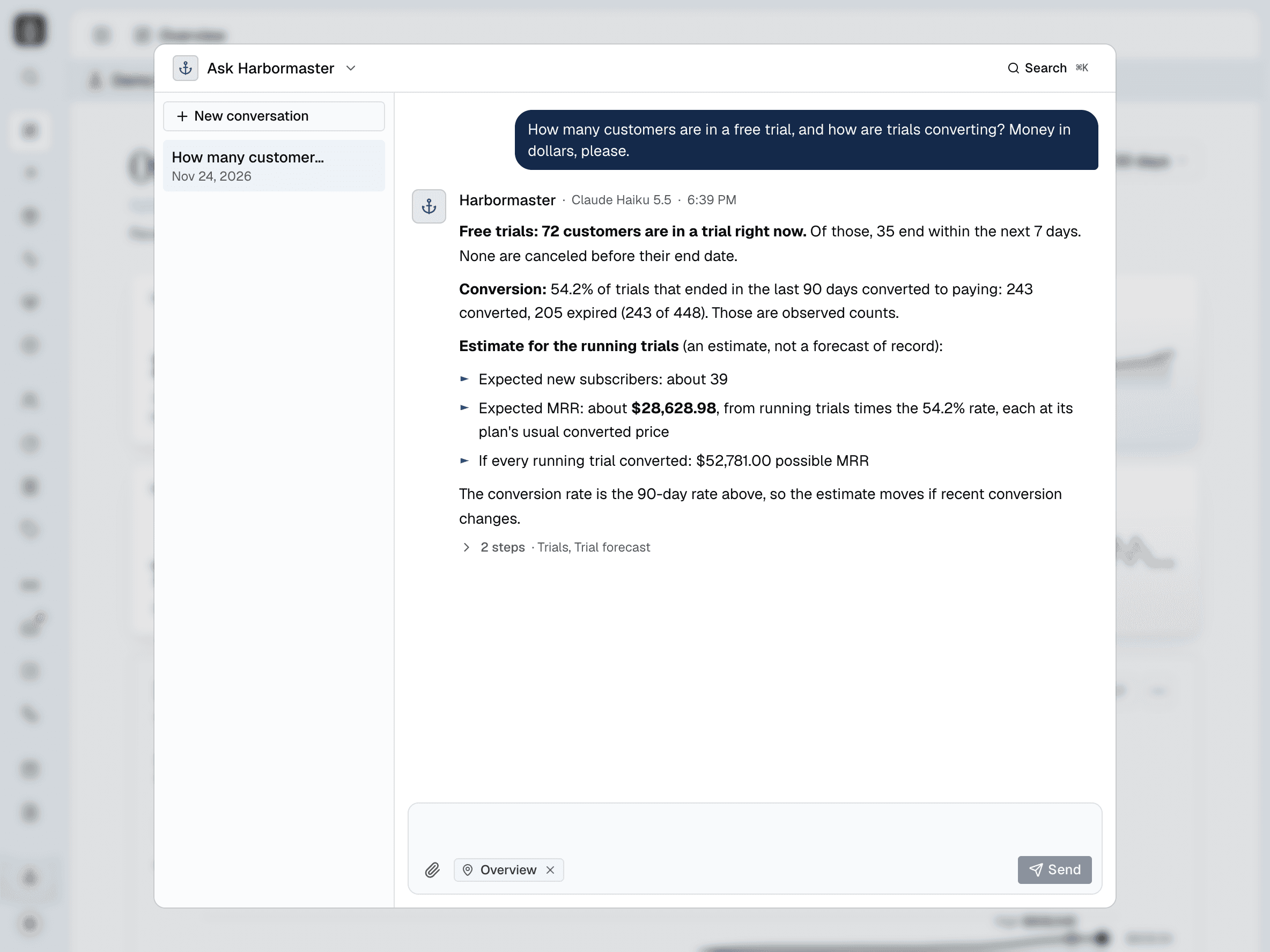
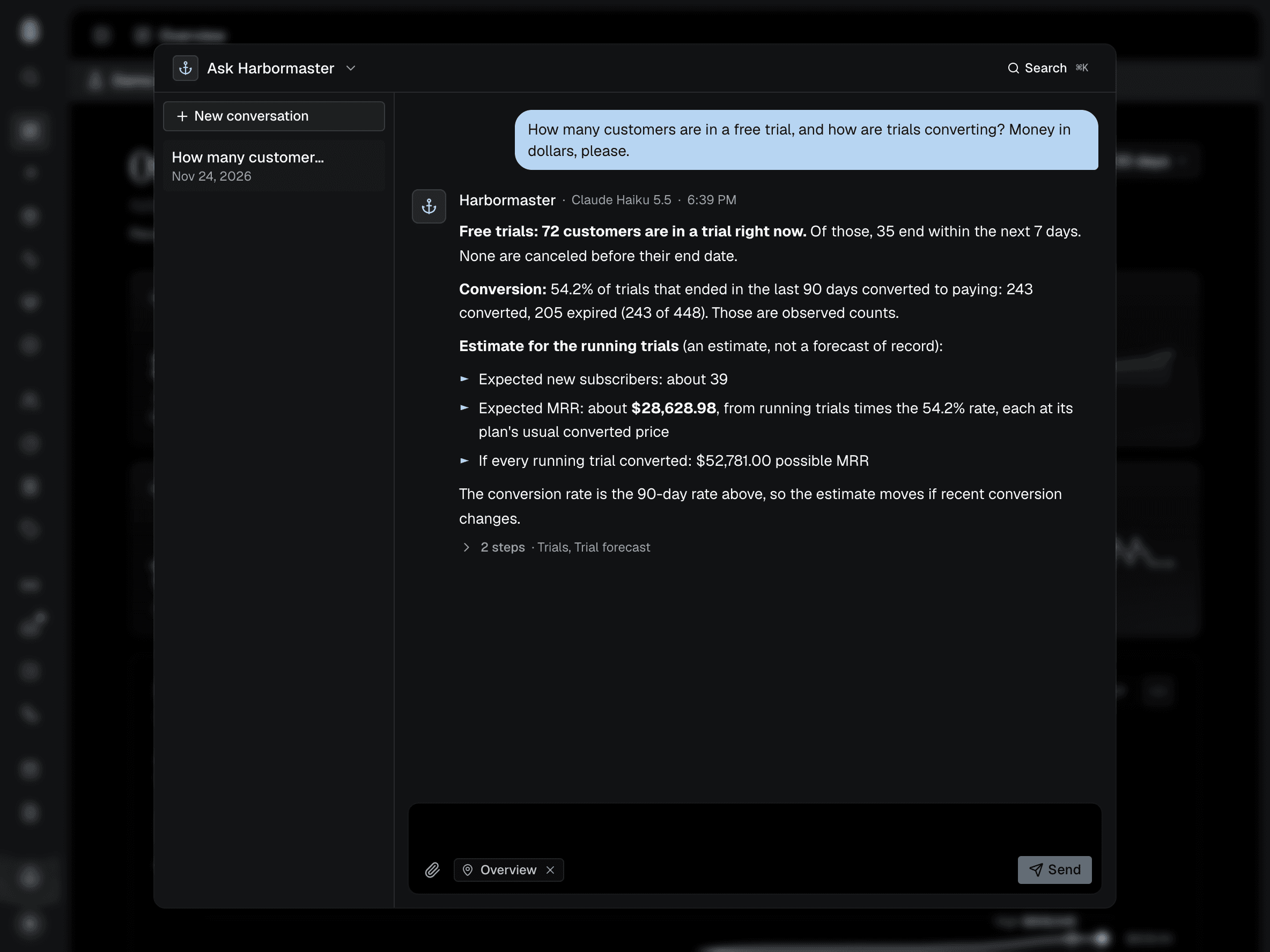
Ask Harbormaster answering how many customers are in a free trial and how trials are converting, with the steps it took.

Ask, and get the answer

Ask how trials are converting or which accounts are at risk, in plain words, and get the answer with its working shown.

More customers hear from you

Agents write the emails your team never had time for. A person approves each one.

Answers in Slack

Ask it from Slack, Telegram or WhatsApp and you get answers in the same chat, so nobody has to open another tool.

A team that already knows the job

The win-backs, ticket replies and price checks your team never gets to, done by specialists from day one, approved by your people, and better every week.

Retention team · 3 agentsDone

Win back last month's cancellations over $500 a month

  • Data Analyst14 accounts. 9 left over price; 5 stopped logging in first.
  • Pricing AnalystAn annual plan at 20% off keeps 7 of the 9 above cost.
  • Email Marketer7 drafts in the Outbox, each with its reason.
Improvement · 🛟 Support Responder

When a card has failed

Ask them to update the card in settings.

Send the billing portal link; settings can't change a card.

Why: six customers this week wrote back asking where to find it.

ApproveDecline

Useful from the first day

Support, email, pricing and analysis specialists who already know the job, so the work starts this week.

Big jobs, finished

Ask for a win-back campaign and a team of agents hands you the finished emails, not a to-do list.

The same mistake, made once

Agents learn from what keeps going wrong, with your approval, so the work gets better every week.

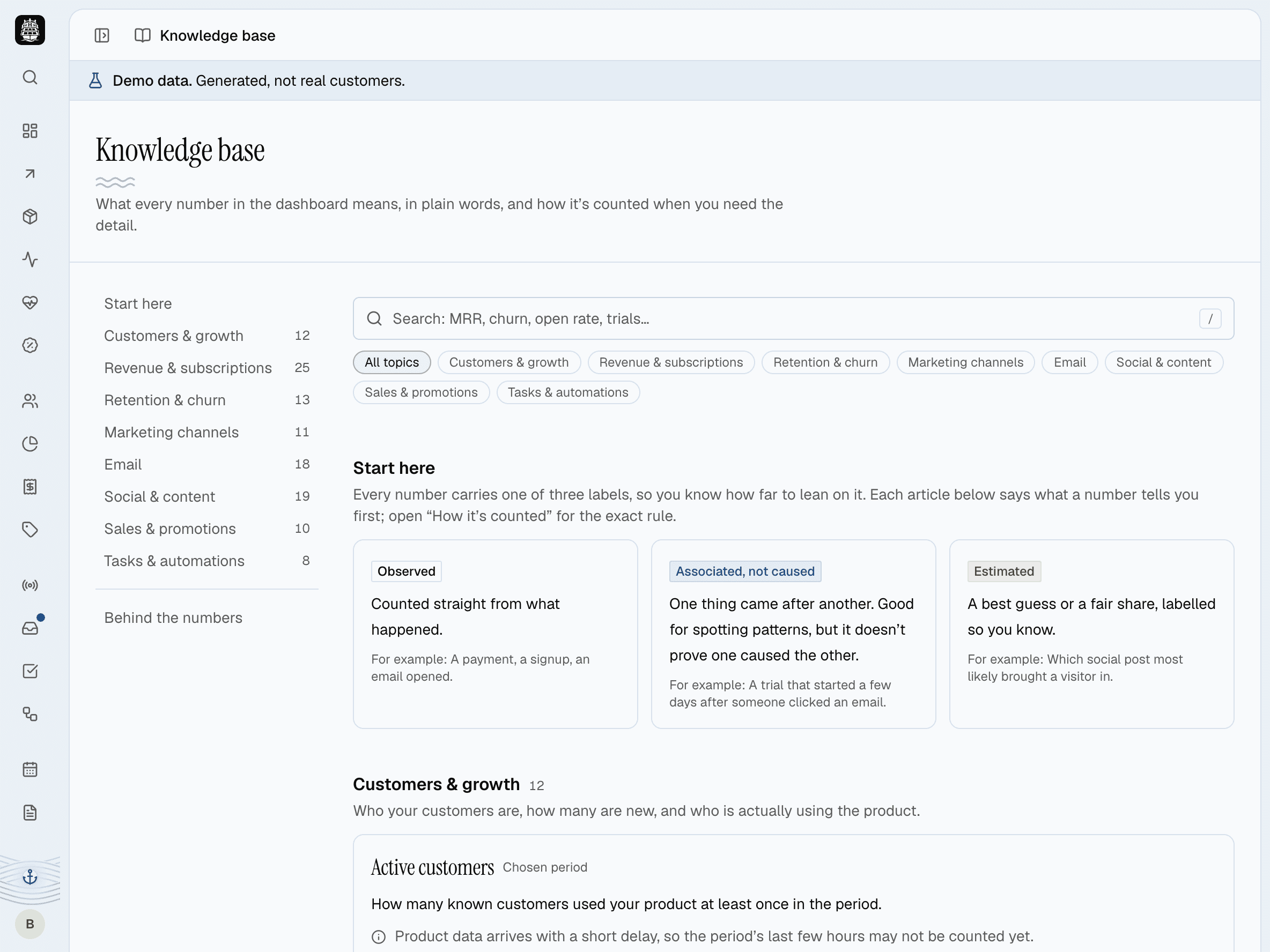
Your numbers, counted your way

Every business counts revenue, churn and an active customer a little differently. We build yours in, so the figures here match the ones you already report.

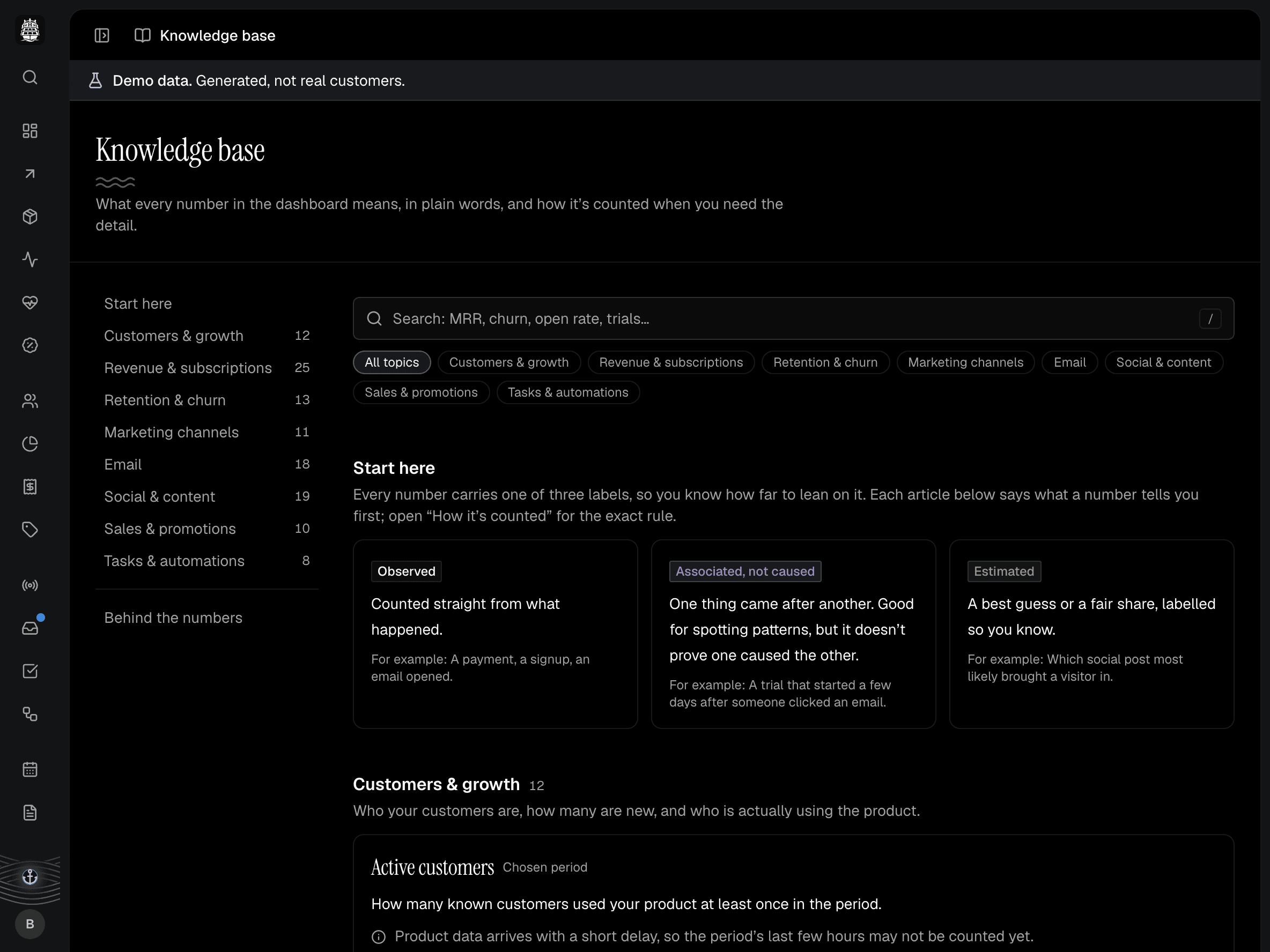
The knowledge base: every figure's definition, grouped by business topic.

Revenue as finance counts it

Refunds, disputes and plan changes are treated the way your books treat them.

Your definition of churn

You decide when a customer is active, at risk or gone, and how trials fit in.

One answer in every meeting

Each figure has a written definition anyone can open, so the board report and the team's view agree.

Your AI tools

Your customer records, in the AI your team already uses.

Claude Code, Codex, OpenClaw, Hermes Agent, Claude.ai and ChatGPT.com connect to Harbormaster HQ over MCP. They answer from the same records and figures your team sees, and they create tasks where you let them.

Claude Code, Codex, OpenClaw, Hermes Agent, Claude.ai and ChatGPT.com connect to Harbormaster HQ over MCP. Each asks a question, calls the endpoint's tools, and answers from the customer records; every call is in the AI log.

Agents, with a key

Claude Code, Codex, OpenClaw and Hermes Agent connect with a key you make: one that only reads, or one that can also create and move tasks.

AI apps, by signing in

In Claude.ai or ChatGPT.com, add the address as a custom connector. Whoever adds it signs in, and the app can do only what they can.

Every call in the AI log

Which app, which tool, what it read and, for a change, what it changed, so anything can be put back.

What you get

All of the above, in every build. Then whatever you ask for.

In every build

  • Revenue at stake, with a figureFailed payments, pending cancellations and accounts going quiet.
  • Sales you can steerWhat a sale is bringing in, while it is still running.
  • Visitors with namesWho is looking, what they read and where they stopped. For B2B.
  • One record per customerWhat they pay, what they use and what they have told support.
  • Follow-ups that assign themselvesThe right person, a due date and the reason, every time.
  • A night shiftReviews done and follow-ups drafted before your day starts.
  • Specialists on staffWin-backs, ticket replies and analysis, done for your team to approve.
  • The AI tools you already useClaude or ChatGPT answering from your customer records.
  • Your definitionsRevenue, churn and customer value, counted your way.
  • Every account in one viewTwo Stripe accounts still add up to one revenue figure.
  • GDPR-readyCustomers' personal data kept out of AI requests. Deployed on your infrastructure.
  • Yours to keepSource code included. Tailored by our team with your automations and agents. A year of updates included.

Built on request

Ask for more, and it's built into your Harbormaster HQ, like everything else.

  • A report for a decision you make often
  • A connection to a tool we don't list
  • A follow-up for how your team works
  • Alerts in Slack
  • Whatever else you want it to do

Compare

Buy it once instead of renting it every year.

Harbormaster HQ is one purchase, tailored to your business, and it keeps running whether or not you ever pay us again. Here is how that differs from the subscriptions teams usually weigh it against.

  • Harbormaster HQ

    7 of 7

  • Gainsight

    0 of 7

  • ChurnZero

    0 of 7

  • Mixpanel / Userpilot

    0 of 7

What it's built forHarbormaster HQ: Finding lost revenue and assigning itGainsight: Large customer success teamsChurnZero: Customer success playbooksMixpanel / Userpilot: Product usage and in-app guidance
Harbormaster HQ:
Finds revenue slipping away across billing, product, marketing and support, and assigns each case to someone.
Gainsight:
Health scores, playbooks and CSM workflows for large success teams.
ChurnZero:
Health scores and automated success playbooks for subscription businesses.
Mixpanel / Userpilot:
Product usage and funnels (Mixpanel), in-app onboarding and guidance (Userpilot).
Tailored to youHarbormaster HQ: Tailored to your businessGainsight: Same product for every customerChurnZero: Same product for every customerMixpanel / Userpilot: Same products for every customer
Harbormaster HQ:
Tailored to your business and what you want it to do.
Gainsight:
One product shared by all of Gainsight's customers; you work within its settings.
ChurnZero:
One product shared by all of ChurnZero's customers; you work within its settings.
Mixpanel / Userpilot:
Each product is shared by all of that vendor's customers; you work within its settings.
Your data stays with youHarbormaster HQ: Your own hosting and dataGainsight: Shared cloud, data copied inChurnZero: Shared cloud, data copied inMixpanel / Userpilot: Shared clouds, data sent out
Harbormaster HQ:
Built for you alone, on your own hosting and database. Your data stays there; it talks only to the services you configure.
Gainsight:
Gainsight's cloud, shared with its other customers. Your data is copied into Gainsight and held under its policies.
ChurnZero:
ChurnZero's cloud, shared with its other customers. Your data is copied into ChurnZero and held under its policies.
Mixpanel / Userpilot:
Each vendor's cloud, shared with its other customers. Your product sends data to Mixpanel and Userpilot, held under their policies.
Every figure can be checkedHarbormaster HQ: Written definitions, plus the sourceGainsight: Closed sourceChurnZero: Closed sourceMixpanel / Userpilot: Closed source
Harbormaster HQ:
A written definition for every figure, and the source to check it.
Gainsight:
Inside Gainsight, closed source.
ChurnZero:
Inside ChurnZero, closed source.
Mixpanel / Userpilot:
Inside each product, closed source.
No per-seat feesHarbormaster HQ: One purchaseGainsight: Per CS seat, plus servicesChurnZero: Seats, volume and modulesMixpanel / Userpilot: Metered by events or users
Harbormaster HQ:
One purchase, quoted for your build. No per-seat fees.
Gainsight:
An annual license per CS seat, usually with implementation services on top.
ChurnZero:
An annual contract quoted on seats, customer volume and modules.
Mixpanel / Userpilot:
Mixpanel by events tracked, Userpilot by monthly active users.
AI on your termsHarbormaster HQ: Your own AI account, no data keptGainsight: Their models and termsChurnZero: Their models and termsMixpanel / Userpilot: Their models and terms
Harbormaster HQ:
Optional: agents work from your records in the app, Slack, Telegram or WhatsApp, on your own AI account with no data kept, and the AI tools your team already uses can work from them too.
Gainsight:
Gainsight's AI agents and copilot, on its models and terms.
ChurnZero:
ChurnZero's AI features, on its models and terms.
Mixpanel / Userpilot:
Each vendor's AI assistants, on their models and terms.
Yours to changeHarbormaster HQ: Full source accessGainsight: Admin settings and APIsChurnZero: Admin settings and APIsMixpanel / Userpilot: Settings and APIs
Harbormaster HQ:
Modify or extend it with source access, including with AI tools.
Gainsight:
Within Gainsight's admin settings and APIs.
ChurnZero:
Within ChurnZero's admin settings and APIs.
Mixpanel / Userpilot:
Within each product's settings and APIs.
Keeps running if you stop payingHarbormaster HQ: Your version keeps runningGainsight: Access endsChurnZero: Access endsMixpanel / Userpilot: Access ends
Harbormaster HQ:
A year of updates included. Your version keeps running indefinitely.
Gainsight:
Access ends with the contract.
ChurnZero:
Access ends with the contract.
Mixpanel / Userpilot:
Access ends with the subscription.

From each vendor's published materials and public pricing reports, November 2026. Plans and features change, so check their current terms. Gainsight, ChurnZero, Mixpanel and Userpilot are trademarks of their owners.

Ownership

Bought once.
Yours to keep.

There is no subscription. You keep the code, the data and the deployment, and Harbormaster HQ keeps running whether or not you buy anything from us again.

Your data stays yours

It runs in your own hosting account. You decide who has access.

Change it whenever you like

Your developers have the source code, and can add reports and connections as the business changes.

No renewal to keep it on

You own it outright. A year of updates is included.

How we build yours

Start with one problem
that's costing you money.

Delivered in
2–3 weeks
From your team
Access to your systems, and one person who knows how you count.
  1. 01

    Pick the problem

    Failed payments, trials that don't convert, accounts leaving, visitors you never reach. Choose one, and how you will know it is improving.

  2. 02

    Give us access

    We connect the systems that hold the evidence: billing, product, email and support. You grant read access; we do the work.

  3. 03

    Tell us how you count

    Your definitions of revenue, churn and an active customer go in, along with who on your team handles what.

  4. 04

    Take it over

    We set it up for you. You get the source code and a year of updates.

FAQ

Q&A

How is it priced?

We quote one price for your business after the walkthrough. We hand over a turnkey-ready system with your automations, agents and tools so you can touch the ground running. External services (PostHog, etc.) are billed by their respective providers.

How long does it take?

It takes 2–3 weeks from start to handover, depending on how many automations we set up.

What do you need from us?

Read-only access to the systems you want connected, your definitions of revenue and churn, and one person to work with us via email during setup.

Which systems do you connect?

Billing, product analytics, email, CRM, support and social scheduling, including the ones shown at the top of this page. Each can be connected more than once, so two Stripe accounts still give you one revenue figure and one list of customers. Your own systems, like a warehouse or a returns desk, can also send custom events to Harbormaster HQ.

Can we use the AI tools we already have?

Yes. Harbormaster HQ is compatible with Claude Code, OpenClaw, Hermes Agent, Claude.ai, ChatGPT.com and any agent you've built in-house.

We already have billing analytics. Why this?

Billing analytics tells you what was paid. It can't tell you that a valuable account stopped using the product last month, or which campaign brought the customers who renew. That takes billing joined to everything else.

What exactly do we own?

The deployment, a copy of the source code, which you can use and modify, including with AI tools, and a year of updates. You can't resell or publish it.

Who runs it once it's handed over?

We hand over a turnkey system, set up with your automations, agents and tools, so your team can hit the ground running. It runs in your own hosting account, and your quote includes support after handover.

Where does our data go?

Nowhere new. It stays on your own hosting (like Railway.app). The AI features are optional and can be switched off. When they're on, you pay the AI provider (OpenRouter) directly.

See it working on a business like yours.

In 30 minutes we walk through a failed payment, an account at risk and a prospect worth calling, on demo data for your kind of business. Then we talk about yours.